My Plex setup in 2023
It’s been years since I created my Plex server and approximately a week since I last broke it! Some stuff has changed so now’s probably a good time to make an update for me to reference when I continue to break things in the future!
A good amount has changed so I’ll break this down into some chunks.
Note: This is a follow up to my previous post so you’ll prob want to referene that for some context.
Torrenting changes
Previously I used the transmission-openvpn container to route all torrent traffic through a vpn. This was pretty great up until some private trackers didn’t like the version of transmission in this container and I also started running into a bunch of 403 errors with it. The WebUI was also feeling pretty clunky and would lag out all the time.
I held on for a while since I couldn’t find any good torrent client + vpn docker images but everything changed when I discovered gluetun (not the bread kind)!
Glueten is a VPN client that I could just plug any containers into to route their network traffic. Perfect!
I added on qBittorrent (since it seems to be loved across all my private trackers) and deluge (I like the name) so now the flow looks like this:
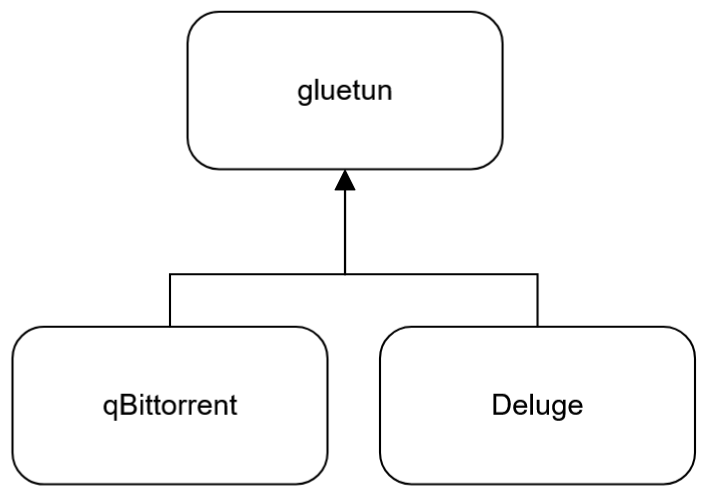
I didn’t want to remake the flow chart from my previous post but if you can imagine all this slotted into where the Transmission OpenVPN section is, that’d be awesome!
Why two torrent clients?
Torrents from private trackers usually have seeding quotas so I wanted to keep these separate from public torrents. Now I can hop into my public client and remove things without a care (after seeding a bit dw lol).
Folder structure changes
I didn’t talk about it in my original post but from the .env file I provided, you could see I had my downloads in /opt/downloads and my media in /mnt/gdrive. Under the hood, /opt/downloads was a symlink to a local HDD folder and /mnt/gdrive was the combination of my Google Drive mount and another folder in that local HDD. Any downloads would, upon completion, be copied over to that gdrive folder, where they’d sit locally on the HDD and then be uploaded and deleted locally. To summarise, everything I download is duplicated. The original is left alone to keep seeding, and the duplicate is uploaded and then removed locally.
If everything sat in the gdrive folder, I’d skip the copy step, but I think I’d incur a heavy performance penalty since I’d be pushing files directly to Google Drive via the mount point. So unfortunately, I end up duplicating the files I download.
Consequently, I was usually worried about storage space. At the time of the first article I had one HDD mounted but I’ve added some more since then. I didn’t want to add all of these volumes to my docker images since that’d get really annoying to maintain, so I ended up using mergerfs to merge them all into one folder called data. Now I can just pool my drives together and have one mega-drive!! Storage space worries eliminated!
Note: If one drive in the pool fails, only the data on that drive will be lost.
The new folder structure looks like this:
/mnt/
├── data
│   ├── downloads
│   │   ├── complete
│   │   └── incomplete
│   ├── gdrive_local
│   └── watch
├── gdrive_cloud
└── gdrive
    ├── Movies
    ├── TV
    └── TV_Anime
I definitely need a better way to handle downloads and uploading in the future, but until then I’ll keep throwing storage drives at the problem! 😈
Docker changes
I added a couple images and changed others a bit as follows…
Added Prowlarr
[Prowlarr] is an indexer manager/proxy similar to Jackett but IMO, nicer. I’ll probably remove Jackett soon and go all-in on Prowlarr. I prefer the interface and how it shows up in Sonarr/Radarr (shows the tracker in parenthesis so I still know where the torrent was sourced from).
Added Plex-Meta-Manager
Plex Meta Manager manages metadata as the name implies. It adds some cool dynamic collections and makes my movie thumbnails look pretty!
Watchtower exceptions
Watchtower did its job too well and my torrent clients kept updating to the latest version – bad for private trackers since they expect specific verions! I’ve since added com.centurylinklabs.watchtower.enable=false to the gluetun and qbittorrent images to prevent auto-updates just in case. I’ll just update those manually.
Conclusion
And that’s everything! I can add/remove (prob not the best idea to remove) drives as I please, my torrents are easier to manage, I have some plex goodies, and hopefully nothing auto-updates into breaking! I’ve been running this setup for a few months now and so far so good!
Until next time things break,
Swap