A Quick Primer on API Calls From Java
API calls are just network requests to some endpoint (Some base url + some extension).
That endpoint can take serveral parameters and will return a status code and maybe some data if all went well.
Network Requests
First lets go over what a network request entails On a very simple level, a network request contains a header and a request body:
The header usually includes information about the request such as an auth key, the type of content it’s sending, and/or what type of content it wants to recieve.
The request body usually contains the information you give to the server to work with such as the paramaters for some endpoint.
Network Requests From Java
Making a network request from Java is pretty easy! We can use the HttpURLConnection class to open a connection and then a InputStreamReader with a BufferedReader to get our response body!
If we want to add headers, we can even do that via the setRequestProperty function from the HttpURLConnection class!
/**
* Simple pure-Java function to make a get request to a given url
*/
private static String getRequest(String url) throws IOException {
    URL url = new URL(url);
    HttpURLConnection connection = (HttpURLConnection) url.openConnection();
    connection.setRequestMethod("GET");
    connection.setRequestPropery("SomeHeader", "SomeValue");
    BufferedReader in = new BufferedReader(new InputStreamReader(connection.getInputStream()));
    return in.readLine();
}
Yelp API Example
Lets take a look at the Yelp API for an example:
Most of this is documented fairly well on their API page but it can definitely be daunting to look at if you’re unfamiliar with the terminology.
Look at all the endpoints!
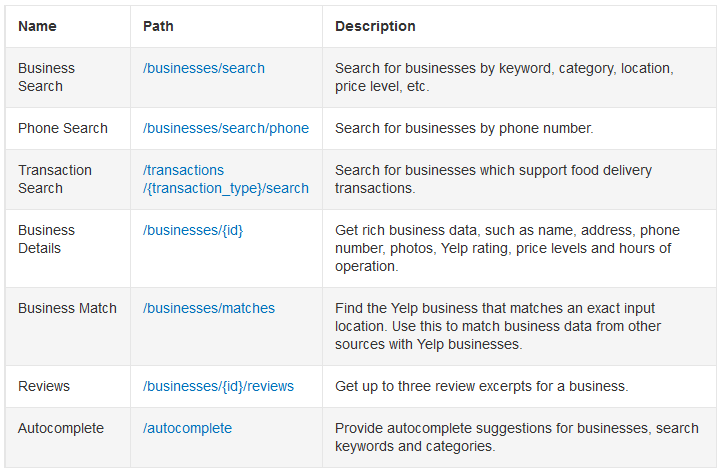
For this example, lets specifically look at the Buisiness Search endpoint. We want to get a list of the first 15 restaurants near LA that sell french fries, all sorted by rating.
At the top of the documentation for it, the base url is defined as,GET https://api.yelp.com/v3/businesses/search, which makes sense since we should make a GET request to the base url https://api.yelp.com/v3 + the endpoint businesses/search.
Authentication
If we make a call to this link from our code or from our browser, we get the following response:
{
  "error": {
    "code": "VALIDATION_ERROR",
    "description": "Authorization is a required parameter.",
    "field": "Authorization",
    "instance": null
  }
}
As the error message indicates, this is because we’re missing our authentication! You might notice, if you check the status code of the request, that this resulted in a status code of 400. This code means Bad Request since our request was missing key fields (in this case our auth key). I wonder why Yelp doesn’t return 401: Unauthorized instead… 🤔
Now, lets fix this! If we navigate over to the Authentication Page on Yelp’s documentation, we can get ourselves an API key! But how do we use it now? That’s actually pretty simple!
As defined in their documenation, we need to set the Authorization HTTP header as Bearer API_KEY! (The Bearer is imporant!!). So lets say our API key was abc123, our auth header would be set to Bearer abc123.
You can learn more about authentication schemes and why we need to include Bearer here
If we make a request now, we get this:
{
  "error": {
    "code": "VALIDATION_ERROR",
    "description": "Please specify a location or a latitude and longitude"
  }
}
We don’t get an authentication error, which is good, but we seem to be missing parameters now!
Parameters
Many times we query an endpoint to get specific information. In this case we want to find some restauraunts but ONLY the ones near us! This means we need to pass in some parameters so that the API knows which restaurants to return.
Let’s take a look at what parameters the API offers. You can check out the full list here by the way.
There’s a lot of them! Good thing many are optional!
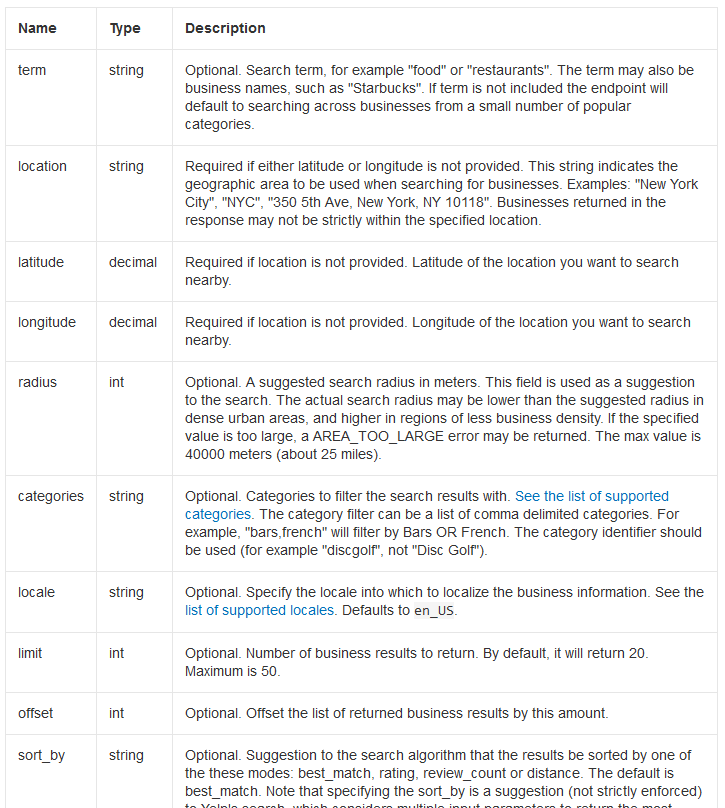
From our previous request response, we know that to perform a search we at least need a location OR a latitude and longitude. Let’s use location here.
The yelp api tells us to put our parameters in the query string so lets do that. I want to add location and the table tells me that it’s a string value.
If our query url here is https://api.yelp.com/v3/businesses/search and I need to put params in the query string, I would do it like so:
- Start with the query url:
https://api.yelp.com/v3/businesses/search - Add a question mark to the end of it to signify the start of the parameters
- Add a parameter and value like so
param=value(If there are spaces, replace them with%20) - Separate additional parameters by an ampersand
&
If I set location to LA, I get this:https://api.yelp.com/v3/businesses/search?location=LA
If I run that query, I get the first 20 restaurants near LA. I want the first 15 restaurants that sell french fries and I want to have them sorted by restaurant rating.
If we double check that parameter table, categories, limit, and sort_by immediately pop out.
categoriesis a comma separated stringsort_byis a string with a few defined values as modes (We should go withratingfor mode)limitjust takes a number which can, at max, be 50
With all that in mind, here’s our new query string:
https://api.yelp.com/v3/businesses/search?location=LA&categories=french%20fries&sort_by=rating
Here’s what we got:
{
  "businesses": [
    {
      "id": "TOtRBm4rnHtHo2S7-6LW5w",
      "alias": "carnes-asadas-pancho-lopez-los-angeles-2",
      "name": "Carnes Asadas Pancho Lopez",
      "image_url": "https://s3-media4.fl.yelpcdn.com/bphoto/zpWefK-bJtcA9sY3O2UB7Q/o.jpg",
      "is_closed": false,
      "url": "https://www.yelp.com/biz/carnes-asadas-pancho-lopez-los-angeles-2?adjust_creative=aEqgAhZHRO7Q5fSUT8flEw&utm_campaign=yelp_api_v3&utm_medium=api_v3_business_search&utm_source=aEqgAhZHRO7Q5fSUT8flEw",
      "review_count": 207,
      "categories": [
        {
          "alias": "mexican",
          "title": "Mexican"
        },
        {
          "alias": "delis",
          "title": "Delis"
        }
      ],
      "rating": 5.0,
      "coordinates": {
        "latitude": 34.0838374478871,
        "longitude": -118.213408961892
      },
      "distance": 10247.879553494453,
      ... Truncated fields for compactness
    }, ... Truncated restaurants for compactness
  ],
  "total": 240,
  "region": {
    "center": {
      "longitude": -118.32138061523438,
      "latitude": 34.0615895441259
    }
  }
}
Here’s the same java function from before, modified to perform the above request.
/**
* Simple pure-Java function to make a get request to a given url
*/
private static String getRequest(String url) throws IOException {
    URL url = new URL(url);
    HttpURLConnection connection = (HttpURLConnection) url.openConnection();
    connection.setRequestMethod("GET");
    connection.setRequestPropery("Authentication", "Bearer abc123");
    BufferedReader in = new BufferedReader(new InputStreamReader(connection.getInputStream()));
    return in.readLine();
}
Handling Request Responses In Java
Assuming we used the function from the previous example to make our request, we now have a JSON string. Looking at the Yelp API documentation, we also have the exact structure of our response.
We can use the defined structure to write up a few Java classes that will map to the JSON file so that we can use GSON to parse it. Since there are nested JSON objects here, we’ll probably end up with multiple classes made. Here’s the gist of it:
public class ApiResponse() {
    private ArrayList<Restaurant> businesses;
    // You'll need to come up with the Restaurant class that represent each business in the JSON
    // and all the other classes needed to contain any nested data (catergories for example)

    // We can ommit any parameters we don't care about and GSON will just ignore them when parsing

    // Getter for encapsulation
    public ArrayList<Restaurant> getBusinesses() {
        return businesses;
    }

    // This class doesn't need a constructor since GSON will construct it via reflection
}